
When a driving school owner looks for software to manage the schedule, the first thing they usually want is a convenient calendar. They want to see instructors, vehicles, and available time slots. They want to move a lesson, reschedule it, call a student, or send a message.
But in practice, it quickly becomes clear that a calendar alone is not enough.
A driving lesson is not simply a booking at 10:00. At 10:00, the student, instructor, and vehicle all need to be available at the same time. The student must have paid hours remaining. The vehicle must not be in for maintenance. The instructor must be working that day and qualified for the required category. And if the lesson is rescheduled, the change needs to be reflected for everyone involved.
When a school has hundreds of lessons and dozens of instructors and vehicles, managing everything manually becomes too complicated.
That is why a good driving school management system needs to solve more than just the question “Where do we put this lesson?” It needs to control the entire process around the lesson.
1. A Lesson Should Only Be Booked When It Can Actually Take Place
Imagine a typical situation. A student wants a lesson on Tuesday at 3:00 PM. At first glance, the time looks available. But the system should check several other things:
- Is the instructor working at that time?
- Is the required vehicle available and not in for maintenance?
- Is the vehicle already being used by another instructor?
- Does the instructor have a break or another lesson scheduled?
- Does the student have available hours remaining?
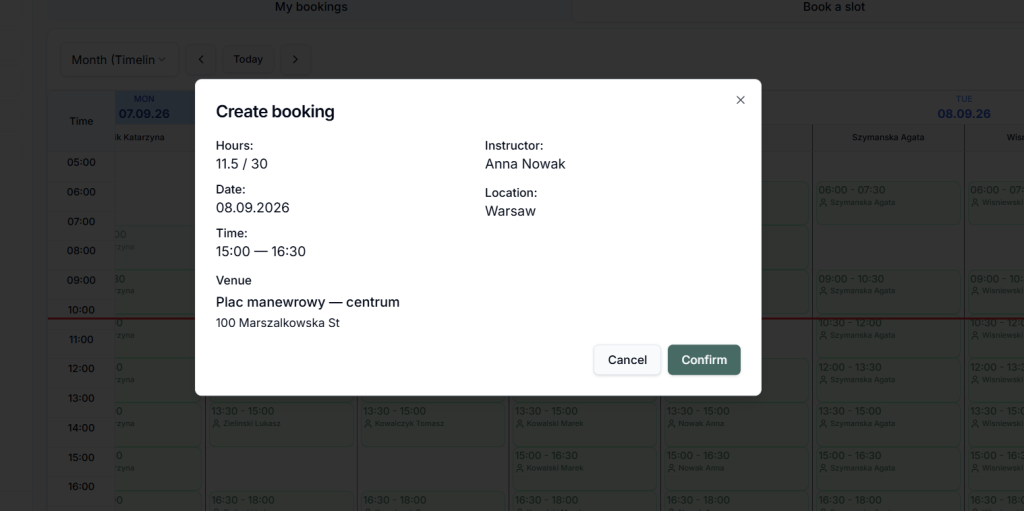
If even one of these conditions is not met, the lesson should not be created.
This is where a simple calendar starts to differ from a real management system.
A good system should not only display the schedule but also verify whether a booking is actually possible.
This helps prevent one of the most frustrating situations for an administrator: discovering in the morning that two lessons have been scheduled for the same vehicle, then having to call students and manually rebuild the schedule.
2. A Vehicle Is a Resource Just Like an Instructor
Many driving schools focus primarily on instructor schedules. But every vehicle has its own schedule too.
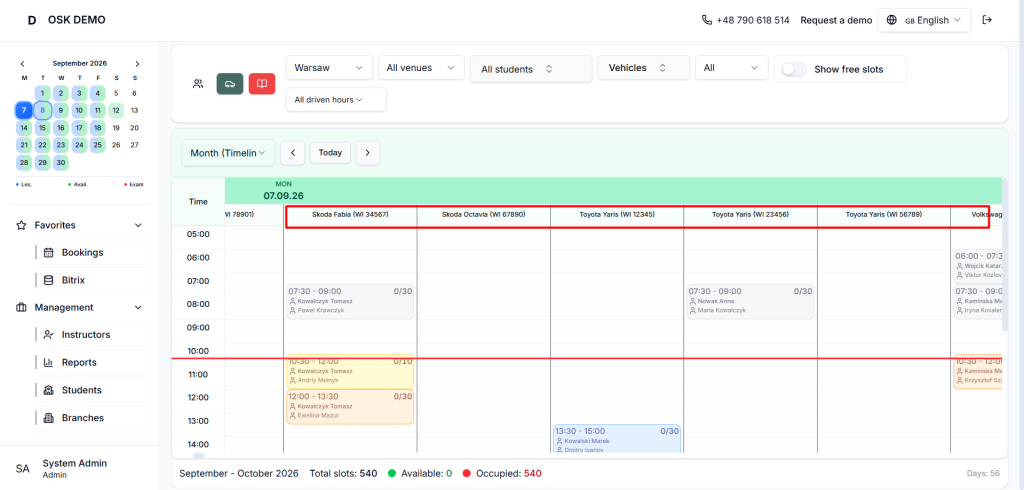
A vehicle may be:
- being used for a lesson;
- reserved by another instructor;
- temporarily unavailable;
- in for maintenance;
- needed for a state driving exam.
That is why vehicles need their own calendars.
An administrator should be able to see not only “who is using this vehicle right now”, but also what is happening with it before and after a particular lesson.
This makes it much easier to change a vehicle or reschedule a lesson without manually checking several spreadsheets.
3. A Student’s Remaining Hours Are Also Part of the Schedule
There is another important element that often exists outside the calendar: how many driving hours does the student have left?
If this information is stored somewhere else — in Excel, a CRM, or an administrator’s notes — problems will eventually appear.
The student calls:
“How many driving hours do I have left?”
The administrator checks the records. The instructor keeps their own notes. After the lesson, someone needs to deduct the used hours. And if the student wants to book several more lessons, the remaining balance has to be checked again.
It makes much more sense when all these processes are connected:
The student buys a package → receives a specific number of hours → books lessons → completed lessons are deducted → the remaining hours are shown in the student’s account.
If the student is running low on hours, the school can offer additional lessons.
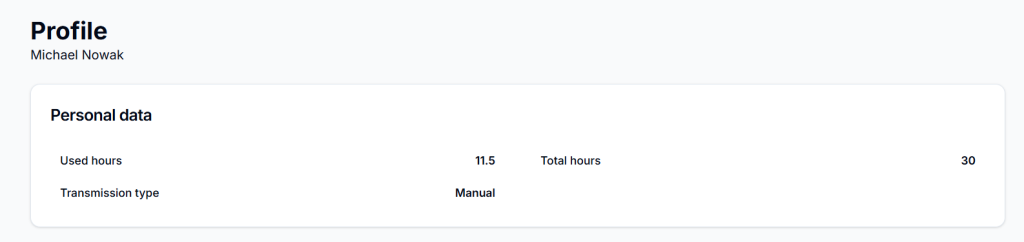
In other words, the schedule is connected not only to time, but also to what the student has purchased and how much training they have left.
4. Payments Should Not Be Separate from the Training Process
Imagine that a student has an unpaid invoice but can still continue booking lessons.
The administrator then has to manually check the outstanding payment, send a message, make a call, and remind the student to pay.
It is much easier when the rules are defined in advance.
For example, a school may decide: no payment — no booking of a new package or lesson.
The student can see their current payment information in their account and pay for their training online.
For the school, this means less manual control and, most importantly, fewer situations where training has already been provided and the payment issue is only addressed afterwards.
5. The Calendar Is Only the Middle of the Process
Another common mistake is to start automating a driving school with the calendar.
In reality, the work with a student starts much earlier.
Someone sees an ad → visits the website → submits an enquiry → the school contacts them → they choose a course → sign an agreement → make a payment → start training → book practical lessons → use their hours → take the exam.
If every stage takes place in a different system, information gradually becomes fragmented.
- Enquiry — in the CRM.
- Payment — somewhere else.
- Schedule — in Excel.
- Communication — in Messenger.
- Remaining hours — with the administrator.
- Vehicle information — in a separate spreadsheet.
- Training progress — sometimes discussed verbally.
As a result, employees constantly move information from one place to another.
That is why modern driving school software should connect sales, training, and day-to-day operations, rather than simply displaying a calendar.
6. Everyone Has Their Own Role — But the Information Should Be Shared
Different people in a driving school work with the same information:
- The student wants to choose a convenient time.
- The instructor knows when they are available.
- The administrator needs to control the schedule and handle exceptions.
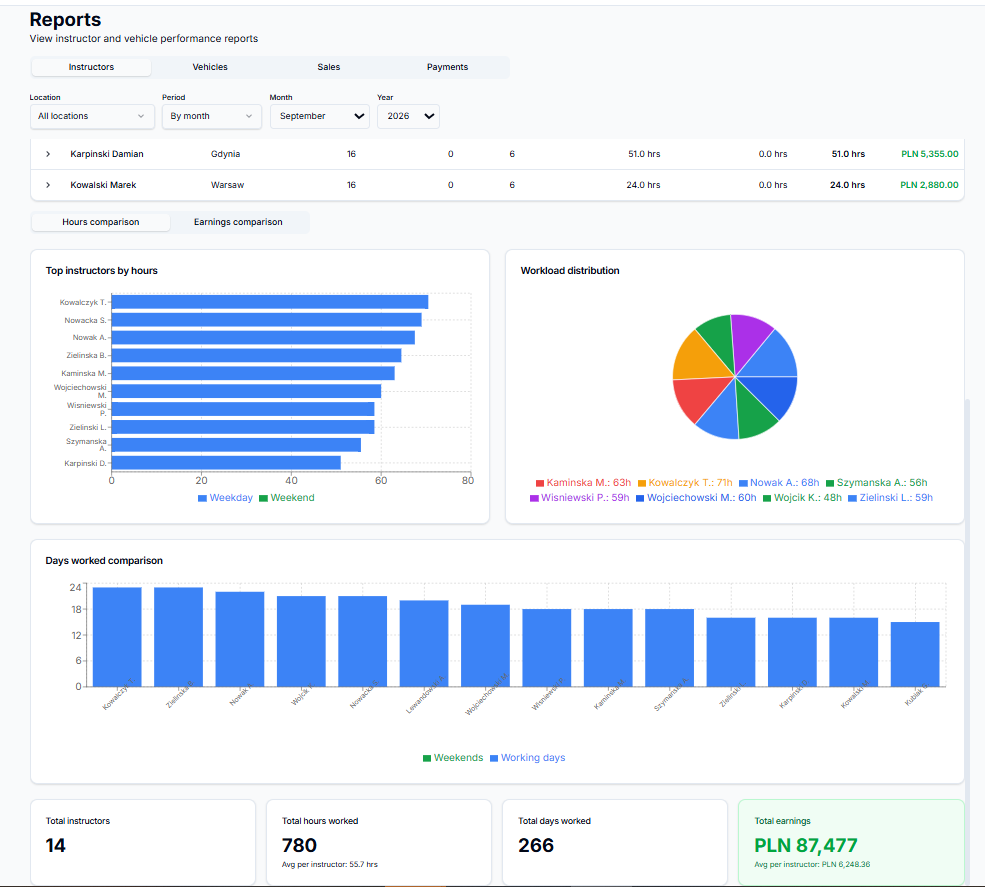
- The owner or manager needs a different view — instructor workload, vehicle utilization, sales, and overall school performance.
That is why each user should have their own interface with the functions relevant to their role.
Student
In their account, a student can:
- view available lessons;
- book driving lessons independently;
- check their schedule and lesson history;
- track their remaining hours;
- purchase additional services;
- pay invoices;
- receive information from the driving school.
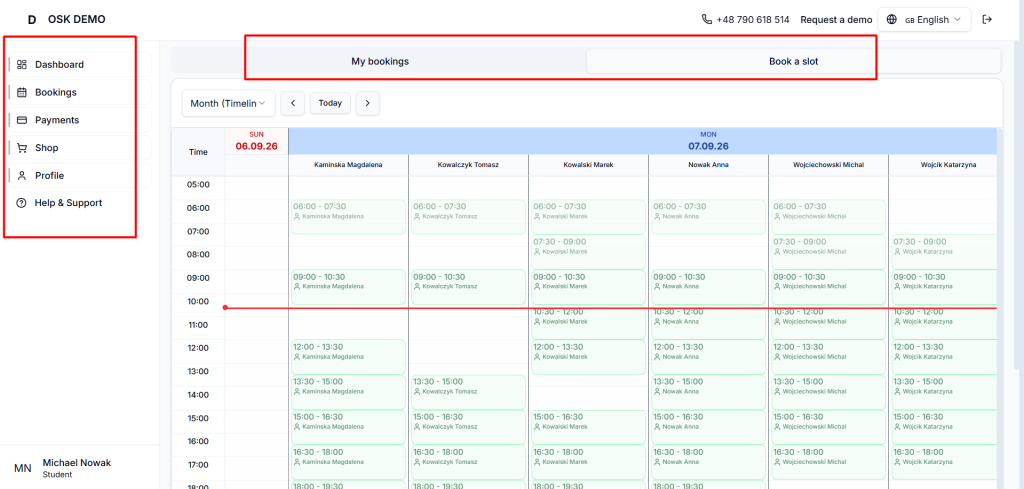
The more questions students can handle themselves, the fewer calls the administration receives.
Instructor
The instructor can see their own schedule, lessons, and availability.
If needed, they can indicate available time slots, add working hours, or change their availability themselves. But this does not mean the school loses control.
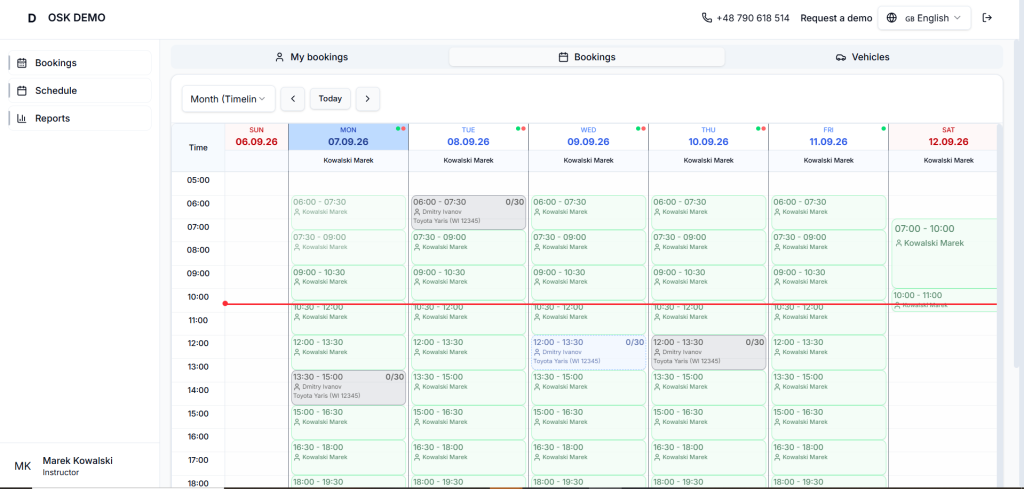
The administrator decides which actions instructors are allowed to perform.
In one school, instructors may arrange lesson times directly with students. In another, all lessons are scheduled by the administrator.
A good system should support both models.
Administrator
For the administrator, the system should serve as a single management center.
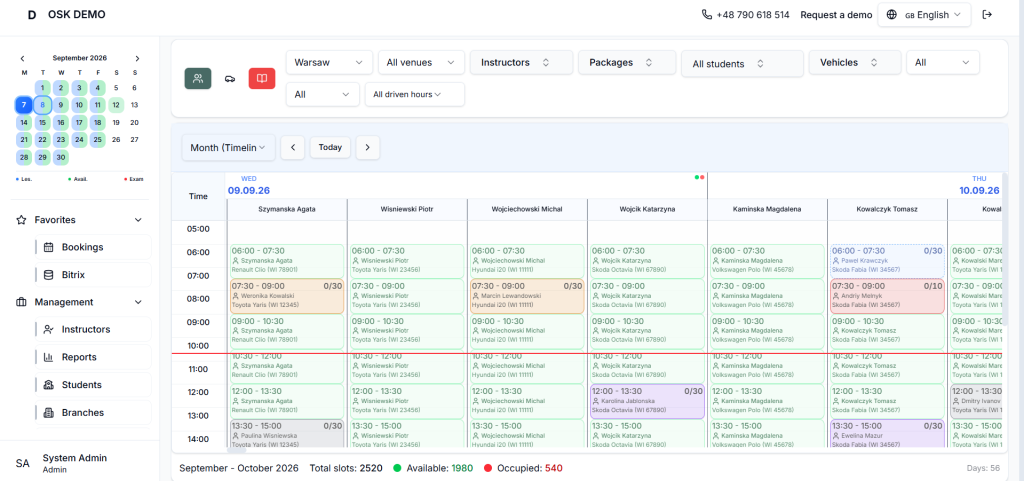
They can manage:
- lessons;
- instructors;
- vehicles;
- students;
- branches;
- training packages;
- state exams.
If necessary, the administrator can change the instructor or vehicle, reschedule a lesson, change its status, or temporarily remove a resource from the schedule.
Owner / Manager
The owner does not need to look at every individual booking.
What matters more is the bigger picture:
How busy are the instructors? How efficiently are the vehicles being used? How many services are being sold? Where are there still unused resources?
This requires reports and analytics — not another spreadsheet with a schedule.
7. What Happens If an Instructor Gets Sick or a Vehicle Goes to the Workshop?
This is where you can really see the quality of a management system.
Because there is no such thing as a perfect schedule.
- An instructor gets sick.
- A vehicle breaks down.
- A student asks to reschedule.
- A vehicle is needed for an exam.
- One branch is overloaded while another has available resources.
In Excel, every situation like this means manual work.
You need to check several spreadsheets, contact several people, move bookings, and make sure the new arrangement does not create another conflict.
In a proper system, changes should follow the same rules as a standard booking.
- If an instructor is unavailable, they cannot be selected.
- If a vehicle is in the workshop, it is not offered as available.
- If a lesson is rescheduled, the new time is immediately visible to everyone involved.
That is automation that actually saves time.
8. How Do You Know Whether You Need a Program with a Calendar or a Full Management System?
There is a simple way to find out.
Don’t ask a software provider whether they have a calendar. They almost certainly do.
Instead, ask:
- What happens if a vehicle is already booked by another instructor?
- Does the system automatically take vehicle maintenance into account?
- Does it check the student’s remaining hours?
- Can a student independently book only genuinely available time slots?
- Can an instructor manage their own availability?
- Can instructor permissions be restricted?
- What happens to the schedule if an instructor gets sick?
- Are training packages, payments, and lessons connected?
- Can you see instructor and vehicle utilization?
- Is the system connected to the CRM and sales process?
If the answer to some of these questions is “you can do that manually”, you are probably looking at a calendar with additional features.
If most of these processes are already built into the system’s rules, you are dealing with a completely different level of automation.
Automation Does Not Start with a Nice Interface
For a driving school owner, the most important thing is not simply having a new application.
The real question is:
How much manual work will disappear after implementation?
- The student books a lesson themselves.
- The instructor indicates their availability.
- The system checks the vehicle.
- Hours are deducted after the completed lesson.
- Payment information is available in the same system.
- Schedule changes are immediately visible to everyone involved.
- A vehicle sent for maintenance is automatically removed from the available resources.
- The owner can see how the school is performing at any time.
That is when software truly starts to change the way a driving school operates.
A good driving school management solution is not another calendar. It is one system that connects schedules, people, vehicles, training hours, payments, sales, and training into one working process.
And the larger the school becomes, the more noticeable the difference between these two approaches.
Try It Yourself
Check out the DEMO version of our solution for driving schools: